
AI is becoming part of everything these days — chatbots, recommendation systems, virtual assistants, and more. As Flutter developers, we can bring these smart features into our apps too.
In this blog, we’ll learn how to integrate a basic AI agent into a Flutter app using simple tools and APIs. Don’t worry — you don’t need to be a machine learning expert. Just basic Flutter knowledge and some curiosity are enough.
✨ What is an AI Agent?
An AI agent is like a smart assistant. It takes some input (text, voice, image), thinks about it (using some logic or a machine learning model), and gives a useful response.
For example:
- You ask: “What’s the weather like today?”
- The AI agent connects to a weather API and replies: “It’s sunny with 32°C.”
We’ll create something similar using Flutter and OpenAI (ChatGPT).
📃 Tech Stack We’ll Use
- Flutter: To build our app UI
- OpenAI API (ChatGPT): To provide smart responses
- HTTP Package: For making API calls
- GetX or Riverpod (Optional): For state management
⚙️ Step-by-Step Guide
1. Create a Flutter Project
flutter create ai_agent_app
cd ai_agent_app
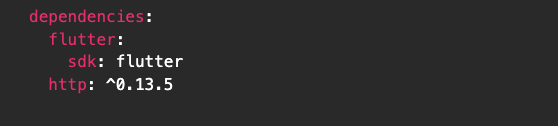
2. Add Dependencies
In your pubspec.yaml, add:
3. Create a Simple UI
Create a basic chat screen with a TextField and a Send button.
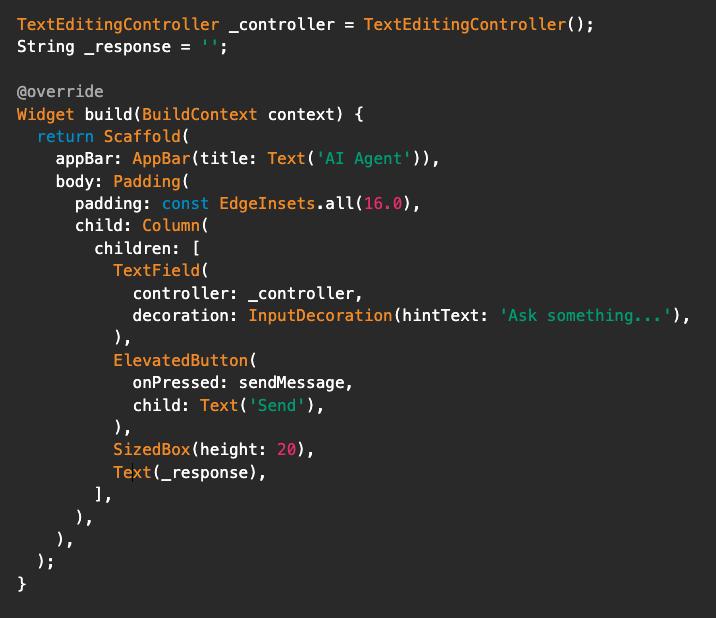
4. Make the API Call
Here’s a simple method to talk to ChatGPT:
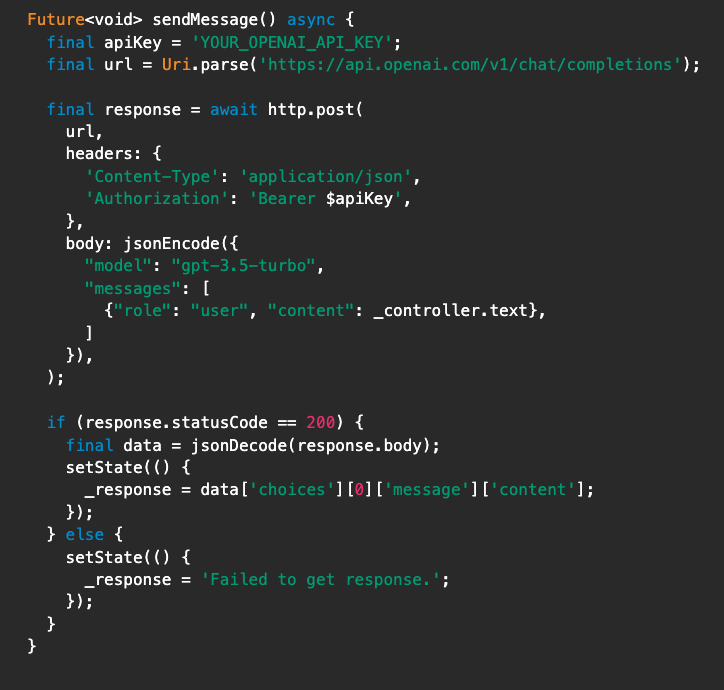
Final Output
Now, you can type something like “What is Flutter” and the app will reply with a smart answer from ChatGPT.
About The Author