

In the rapidly evolving landscape of business applications, standard interfaces often struggle to meet complex user requirements. For professional developers and organizations aiming to push the boundaries of Dynamics 365, the Power Apps Component Framework (PCF) serves as the ultimate bridge between native platform capabilities and bespoke, high-performance user experiences.
What is PCF and Why Does It Matter?
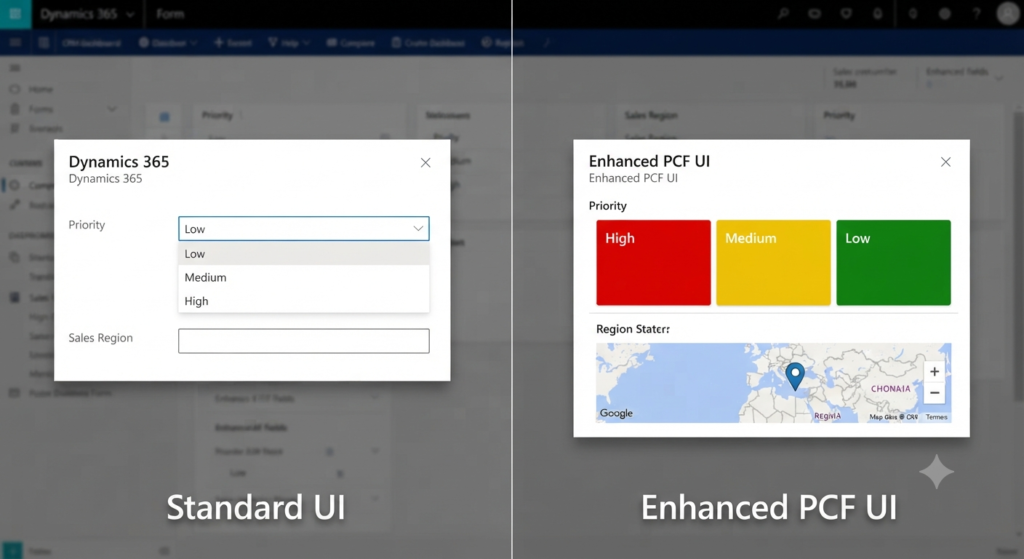
Unlike traditional HTML web resources, which were often difficult to maintain and lacked deep integration, PCF is the recommended, modern framework for building custom code components. It allows developers to create interactive, reusable UI elements that render directly within the application context, providing a seamless, native feel.
By leveraging standard web technologies—including TypeScript, HTML, CSS, and React—developers can build components that are responsive, fast, and visually consistent with the rest of the Microsoft ecosystem.
Key Advantages for Enterprise Development
Organizations adopt PCF to solve specific friction points that hinder system adoption. Its primary benefits include:
- Superior User Experience (UX): PCF replaces unintuitive fields with interactive controls such as signature pads, advanced data grids, or custom calendars, leading to higher user adoption.
- Reusability and Standardization: Once a component is developed, it can be deployed across multiple apps, forms, and environments. This allows organizations to enforce corporate branding and accessibility standards through a single codebase.
- Performance Optimization: PCF components are highly efficient; they support data caching to prevent unnecessary reloads, significantly reducing the memory footprint and improving application responsiveness.
- Rich API Access: Developers gain access to a powerful set of framework APIs, enabling them to integrate device features like cameras, microphones, and location services, or connect to external data sources.
Solving Real-World Problems
When low-code alternatives fall short, PCF steps in. Common use cases include:
- Data Density: Creating custom organizational charts or pivot grids that visualize complex relationships in compact spaces.
- Advanced Inputs: Implementing masked phone inputs, barcode scanners, or drag-and-drop file uploaders with real-time validation.
- Integration: Connecting apps to external hardware or specialized mapping services for real-time tracking.
- Performance Best Practice: Avoiding “Refresh Storms”
- One critical tip for developers: on forms with multiple PCF controls, a single
dataset.refresh()call can trigger a re-render for every component, causing flickering and wasted CPU cycles. To optimize performance, always implement a guard condition in yourupdateView()method to checkcontext.updatedProperties. By ensuring that only the relevant component reacts to changes, you can maintain a clean, high-speed interface.
Conclusion
The Power Apps Component Framework is more than just a customization tool; it is a vital asset for any organization looking to drive efficiency and user satisfaction. By choosing PCF, you are investing in a future-proof architecture that balances the power of professional development with the agility of the Microsoft Power Platform.
About The Author
