
Every time you hit “Send” on an email, a silent, complex digital handoff occurs behind the scenes. Millions of transactional receipts, password resets, and promotional updates flow across the web every second, relying on a single fundamental backbone: the Simple Mail Transfer Protocol (SMTP).
Without a properly setup SMTP server, your application or web platform cannot deliver messages to user inboxes. Instead, emails end up stalled in local queues or flagged directly by major providers like Gmail and Outlook as spam.
In this comprehensive guide, we will break down what an SMTP server is, how it routes email globally, how to configure key settings on major platforms, and practical code snippets for using SMTP across popular environments.
What is an SMTP Server?
An SMTP Server is an application or network computer whose primary purpose is sending, relaying, or receiving outgoing email traffic using the Simple Mail Transfer Protocol.
Think of an SMTP server as the digital equivalent of a mail carrier. When you drop a letter into a mailbox, the mail carrier picks it up, verifies the destination address, sorts it through regional distribution hubs, and hands it off to the recipient’s local post office. An SMTP server performs the exact same sequence for digital messages across network sockets.
How SMTP Works Behind the Scenes
SMTP handles the outgoing journey of an email message. Once the message arrives at the destination server, protocols like IMAP (Internet Message Access Protocol) or POP3 (Post Office Protocol 3) step in to store and display the email in the recipient’s inbox.
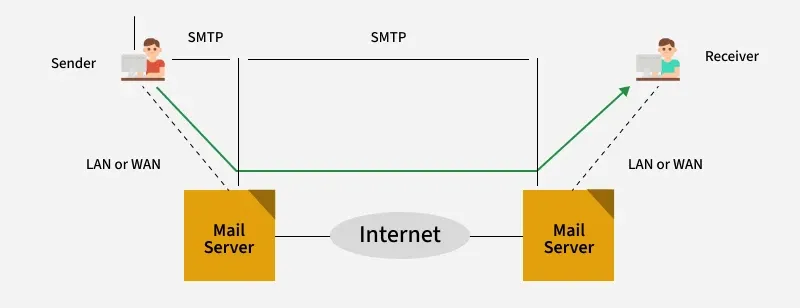
Overview of the SMTP Email Transmission Process. Source: GeeksforGeeks
The Step-by-Step Email Journey
- Email Client Submission (MUA to MSA): You compose a message in your Mail User Agent (MUA), such as Outlook or a custom web app, and hit send. The app connects to the Mail Submission Agent (MSA) via SMTP port 587.
- Authentication & Handshake: The client authenticates using secure credentials (TLS).
- DNS MX Lookup: The sending SMTP server queries the DNS for the destination domain’s MX (Mail Exchanger) record to identify the recipient’s mail server IP.
- Server-to-Server Handoff (MTA to MTA): The sender’s Mail Transfer Agent (MTA) establishes a connection over port 25 with the recipient’s Mail Transfer Agent.
- Final Delivery (MDA to Inbox): The destination MTA hands the message to a Mail Delivery Agent (MDA), which stores it until the user retrieves it via IMAP/POP3.
Key SMTP Components & Port Standards
Understanding network ports is crucial during any SMTP Configuration.
| Port Number | Protocol Standard | Security Status | Primary Use Case |
| Port 25 | Standard SMTP | Unencrypted (Legacy) | Server-to-server MTA relays only (Blocked by most ISPs for end users) |
| Port 587 | Submission | Encrypted (STARTTLS) | Modern standard for client-to-server submission |
| Port 465 | SMTPS | Implicit SSL/TLS | Secure client submission standard |
| Port 2525 | Alternative | TLS Enabled | Non-standard backup port when 587 is blocked |
Popular SMTP Server Solutions
Depending on your architecture, you can choose between managed transactional services or hosting your own server:
- Managed Cloud SMTP Relay Services: SendGrid, Mailgun, Amazon SES, Postmark, Mailtrap.
- Open-Source Self-Hosted MTAs: Postfix, Exim, Sendmail, Haraka.
- Workspace SMTP Providers: Google Workspace (
smtp.gmail.com), Microsoft 365 (smtp.office365.com).
How to Configure an SMTP Server
Let’s look at setting up SMTP configurations on both managed cloud services and self-hosted environments.
1. Setting Up Google Workspace / Gmail SMTP
- Host/Server:
smtp.gmail.com - Port:
587(STARTTLS) or465(SSL) - Authentication: Required (Email address & App Password)
Note: Modern Gmail configurations require Two-Factor Authentication (2FA) enabled and an App Password generated via Google Account Security settings.
2. Setting Up Amazon SES (Simple Email Service)
- Log into the AWS Management Console and select Amazon SES.
- Verify your domain ownership by adding the required TXT/CNAME records to your DNS settings.
- Under SMTP Settings, click Create SMTP Credentials.
- Store the generated IAM SMTP Username and Secret Access Key.
- Use Host:
email-smtp.us-east-1.amazonaws.com(or your active AWS region) on Port587.
3. Configuring Postfix on Ubuntu Server
For system administrators managing their own MTA:
# Install Postfix
sudo apt update
sudo apt install postfix mailutils -y

# Edit Postfix main configuration file
sudo nano /etc/postfix/main.cf
Add or adjust the following baseline parameters inside /etc/postfix/main.cf:
myhostname = mail.yourdomain.com
alias_maps = hash:/etc/aliases
alias_database = hash:/etc/aliases
mydestination = $myhostname, localhost.$mydomain, localhost
relayhost =
mynetworks = 127.0.0.0/8 [::1]/128
mailbox_size_limit = 0
recipient_delimiter = +
inet_interfaces = all
inet_protocols = all

# TLS Configuration
smtpd_tls_cert_file=/etc/letsencrypt/live/yourdomain.com/fullchain.pem
smtpd_tls_key_file=/etc/letsencrypt/live/yourdomain.com/privkey.pem
smtpd_use_tls=yes
Restart the Postfix daemon to apply changes:
sudo systemctl restart postfixCrucial Email Authentication & Security Standards
Setting up the server hardware is only half the battle. To guarantee high inbox deliverability and prevent spoofing, you must configure authentication records in your DNS:
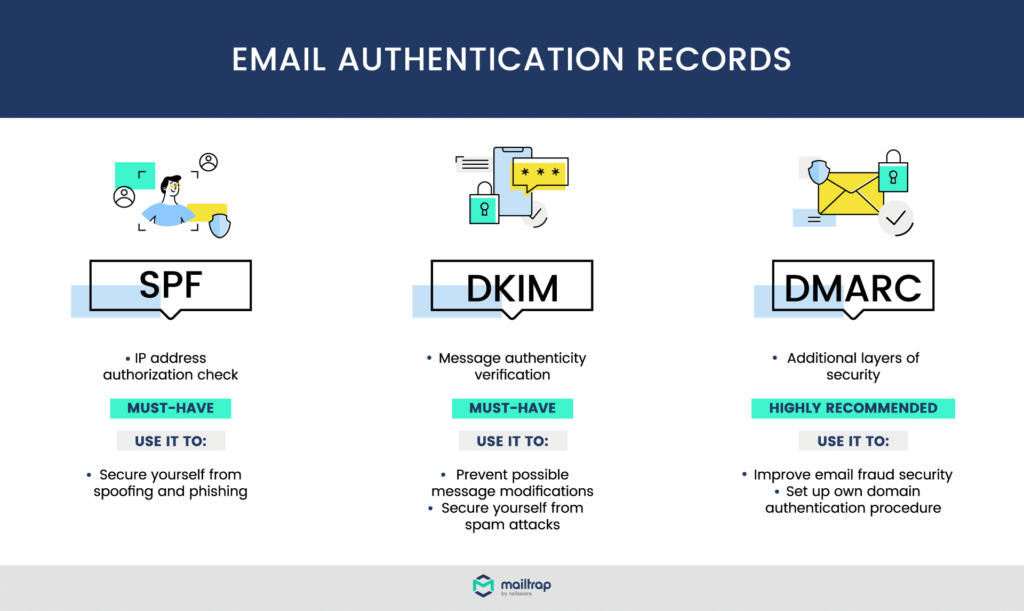
Essential Protocols for Email Deliverability and Authentication. Source: Mailtrap / Email Authentication Explained: SPF, DKIM, DMARC, BIMI
- SPF (Sender Policy Framework): Declares which IP addresses are permitted to send emails from your domain.
- DKIM (DomainKeys Identified Mail): Attaches a cryptographic signature to outgoing messages.
- DMARC: Specifies how receiving servers should treat emails that fail SPF or DKIM checks.
Practical Code Examples: How to Use SMTP
Here is how you connect and send messages programmatically across common backend stacks.
Python (smtplib)
import smtplib
from email.mime.text import MIMEText
from email.mime.multipart import MIMEMultipart

sender_email = "[email protected]"
receiver_email = "[email protected]"
password = "your-app-password"

message = MIMEMultipart("alternative")
message["Subject"] = "SMTP Test Email"
message["From"] = sender_email
message["To"] = receiver_email

text = "Hello, this is a test email sent via Python SMTP!"
message.attach(MIMEText(text, "plain"))

# Connect via Port 587 with STARTTLS
try:
    with smtplib.SMTP("smtp.gmail.com", 587) as server:
        server.starttls()
        server.login(sender_email, password)
        server.sendmail(sender_email, receiver_email, message.as_string())
    print("Email sent successfully!")
except Exception as e:
    print(f"Error sending email: {e}")
Node.js (Nodemailer)
const nodemailer = require("nodemailer");

async function main() {
  let transporter = nodemailer.createTransport({
    host: "smtp.mailtrap.io",
    port: 2525,
    auth: {
      user: "your_smtp_username",
      pass: "your_smtp_password",
    },
  });

  let info = await transporter.sendMail({
    from: '"My Application" <[email protected]>',
    to: "[email protected]",
    subject: "Node.js SMTP Connection Test",
    text: "Automated test message using Nodemailer and SMTP.",
  });

  console.log("Message sent: %s", info.messageId);
}

main().catch(console.error);
PHP (PHPMailer)
<?php
use PHPMailer\PHPMailer\PHPMailer;
use PHPMailer\PHPMailer\Exception;

require 'vendor/autoload.php';

$mail = new PHPMailer(true);

try {
    // Server settings
    $mail->isSMTP();
    $mail->Host       = 'smtp.sendgrid.net';
    $mail->SMTPAuth   = true;
    $mail->Username   = 'apikey'; // SendGrid specific user
    $mail->Password   = 'YOUR_SENDGRID_API_KEY';
    $mail->SMTPSecure = PHPMailer::ENCRYPTION_STARTTLS;
    $mail->Port       = 587;

    // Recipients
    $mail->setFrom('[email protected]', 'Sales Team');
    $mail->addAddress('[email protected]');

    // Content
    $mail->isHTML(true);
    $mail->Subject = 'Order Confirmation';
    $mail->Body    = '<h1>Thank you for your order!</h1>';

    $mail->send();
    echo 'Message has been sent';
} catch (Exception $e) {
    echo "Message could not be sent. Mailer Error: {$mail->ErrorInfo}";
}
?>
Troubleshooting SMTP Connection Errors
When debugging SMTP handshakes, these standard tools prove invaluable:
Testing Handshake via Telnet/Netcat
nc -cv smtp.gmail.com 587
# or
telnet smtp.sendgrid.net 2525
Common Error Codes
- 220: Service ready (Success initial response).
- 250: Requested mail action okay / completed.
- 421: Service not available, closing transmission channel (Often rate-limiting).
- 535: Authentication credentials invalid.
- 550: Requested action not taken: mailbox unavailable or relay denied.
Frequently Asked Questions
What is the difference between SMTP and IMAP?
SMTP is designed exclusively to send and relay messages from client to server or between servers. IMAP is used to retrieve and synchronize email messages from the server inbox down to client devices.
Why is SMTP Port 25 blocked by default on residential ISPs?
ISPs block Port 25 to mitigate spam. In the early days of the web, malware-infected computers turned home devices into botnets sending millions of spam emails directly through open Port 25 relays.
Should I host my own SMTP server or use a managed service?
Unless you require total data sovereignty or handle extreme enterprise volumes, managed services (SendGrid, AWS SES, Postmark) are strongly recommended. Maintaining clean IP reputation scores, PTR records, and un-listing from global blacklists requires significant ongoing maintenance.
Why are my emails going to Spam despite using a valid SMTP server?
Valid server credentials only guarantee transmission—not inbox placement. You must ensure your domain has configured valid SPF, DKIM, and DMARC DNS records, and maintain a high IP reputation.
Can I use SMTP without authentication?
While internal enterprise networks sometimes run unauthenticated IP-whitelisted SMTP relays, public internet relays require authentication (TLS credentials) to avoid being abused as open spam relays.
Master Your Email Infrastructure Today
A robust, well-authenticated SMTP setup is essential for guaranteeing that your application transactional emails arrive reliably in user inboxes. By pairing correct SMTP port choices with modern security standards like SPF, DKIM, and DMARC, you protect your domain’s sending reputation and ensure seamless communication.
Ready to boost your deliverability? Audit your application’s SMTP settings today, enforce TLS encryption, and verify your domain authentication records!
About The Author

Nice Post Thank you.